
Download VR ONE AR – AR app, VR headset, augmented reality, 3D models, interactive experience, ZEISS VR ONE, paper cube, multimedia app, Android app, free download
Overview
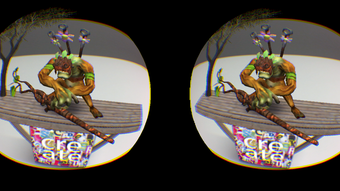
VR ONE AR is a free multimedia Android application developed by Carl Zeiss, designed specifically for use with the ZEISS VR ONE headset. The app delivers an interactive augmented reality (AR) experience by leveraging a paper cube that comes with the headset. Each face of the cube features a unique background image, which the app detects via the device’s camera to project corresponding 3D models into the user’s real-world environment.
This innovative approach combines physical components with digital content to create an immersive and playful AR experience. The software is targeted at consumers interested in exploring accessible AR technology, particularly those already invested in the ZEISS VR ONE ecosystem. It serves as an engaging entry point into augmented reality, ideal for casual users, educators, and tech enthusiasts looking for creative, hands-on interaction.
The app’s reliance on a foldable paper cube template—available on the developer’s website—encourages user participation in setting up the experience. While the developer did not provide additional system requirements, the app is confirmed to run on Android devices compatible with the ZEISS VR ONE headset. Performance details were not specified, but users are advised to allow up to 15 seconds for the live camera view to load in VR mode.
If a black screen appears, closing and restarting the app typically resolves the issue.
Key Features & Capabilities
- AR Cube Detection: The app identifies which side of the paper cube is facing the camera and triggers a unique 3D model based on the detected image. This enables dynamic content interaction without requiring complex setup.
- Interactive 3D Models: Each cube face corresponds to a different 3D scene or animation, allowing users to explore diverse virtual environments through physical manipulation of the cube.
- Integration with ZEISS VR ONE Headset: Designed specifically for seamless use with the ZEISS VR ONE, ensuring compatibility with the headset’s display and motion tracking.
- Free Multimedia Experience: The app offers a cost-free way to access augmented reality content, making it accessible to a broad audience.
- Customizable Paper Cube: Users can download and print a foldable box template from the developer’s website to create their own physical cube, enhancing the tactile and creative aspect of the experience.
These features combine to deliver a simple yet engaging AR experience. For example, a user might place the cube on a table, rotate it to show different faces, and watch as a 3D dinosaur appears on one side and a space station on another. This kind of interaction supports educational applications, creative play, and entertainment.
The app’s reliance on physical input ensures a tangible connection between the real and virtual worlds. While no advanced customization or user-generated content tools were mentioned, the core functionality is built around intuitive, real-time interaction. The developer did not specify additional features or update frequency, but the app remains functional as a standalone AR experience within the ZEISS ecosystem.
User Interface, Workflow & Performance
The user interface of VR ONE AR is designed to be minimal and focused on the AR experience. Upon launch, the app prompts the user to align the paper cube with the camera view. The interface does not include complex menus or settings, emphasizing simplicity and immediacy.
Navigation is entirely gesture-based, relying on physical movement of the cube to trigger content changes. This workflow reduces the learning curve and allows users to start experiencing AR within seconds of setup. The app’s performance is consistent with typical AR applications on Android, though exact resource usage details were not provided.
The developer noted that the live camera feed may take up to 15 seconds to load in VR mode, which could affect initial user perception. A black screen may occur during startup, but the recommended fix—closing and restarting the app—suggests a temporary initialization issue rather than a critical failure. Stability appears to be adequate for basic use, though no long-term usage data or crash reports were published.
The app does not display real-time performance metrics such as frame rate or CPU load. Users are advised to ensure their device meets the minimum requirements for the ZEISS VR ONE headset, though specific hardware benchmarks were not listed. Overall, the workflow is efficient for its intended purpose, prioritizing immersion over configurability.
Compatibility & System Requirements
VR ONE AR is designed for Android operating systems and is compatible with devices that support the ZEISS VR ONE headset. The app has a file size of 22.4 MB, indicating a lightweight installation. The software version is 1.0.0, and it was released on May 16, 2017.
While the developer did not specify exact system requirements, the app is intended for use with a smartphone connected to the ZEISS VR ONE headset. The device must have a front-facing camera capable of real-time video capture and sufficient processing power to render AR content. Compatibility information was partially provided, with no mention of minimum Android version, RAM, or CPU specifications.
The developer did not list supported screen sizes or GPU requirements. Users are encouraged to verify their device’s compatibility with the ZEISS VR ONE headset before downloading. The app does not require internet access for core functionality, though updates may require connectivity.
Installation is straightforward, and the app runs directly on the Android device without external dependencies.
Pros and Cons
Pros
- Free to download and use, making it accessible to a wide audience.
- Designed for seamless integration with the ZEISS VR ONE headset.
- Encourages creativity through the use of a customizable paper cube.
- Delivers an intuitive, gesture-based AR experience with minimal setup.
- Lightweight installation at 22.4 MB, suitable for devices with limited storage.
Cons
- App may take up to 15 seconds to load the camera view in VR mode.
- Black screen issues may occur during startup, requiring app restart.
- Only available for Android, limiting cross-platform access.
- No visible settings or customization options beyond the paper cube.
- Release date is from 2017, suggesting limited ongoing updates or support.
FAQ Section
Is VR ONE AR compatible with all Android devices?
VR ONE AR is designed to work with devices compatible with the ZEISS VR ONE headset. Specific compatibility details were not provided by the developer.
Is the app safe to download and use?
As a free app developed by Carl Zeiss and distributed through official channels, VR ONE AR is considered secure. No security vulnerabilities were reported in the available documentation.
Does the app require an internet connection?
Core AR functionality does not require an internet connection. However, updates or additional content may require connectivity.
Can I use VR ONE AR without the ZEISS VR ONE headset?
The app is designed for use with the ZEISS VR ONE headset. While it may run on a smartphone, the full immersive experience is intended for headset use.
Is the app regularly updated?
The app was released in 2017, and no update frequency was specified. The developer did not provide information on current maintenance or future updates.
Final Thoughts
VR ONE AR offers a unique and accessible entry into augmented reality, combining physical interaction with digital content through a simple paper cube and a dedicated headset. Its lightweight design, free access, and seamless integration with the ZEISS VR ONE ecosystem make it a compelling choice for casual users and tech enthusiasts alike. While the app has limitations—such as a lengthy initial load time and potential startup issues—it delivers on its core promise: an engaging, interactive AR experience.
The lack of ongoing updates and the age of the release may affect long-term usability, but for users within the ZEISS VR ONE community, it remains a functional and fun tool. If you're seeking a straightforward way to explore AR with minimal setup, VR ONE AR is a solid option. Download VR ONE AR now.





.png)

